VS Code v1.110 Makes Agents Practical for Development — But Agent Context Still Resets Between Sessions

Visual Studio Code v1.110 shipped major improvements to agent-mode development. The update introduces controls for long-running agent tasks, better handling of large outputs, and the ability to intervene mid-response — practical affordances that make AI agents usable for real development work rather than simple autocomplete. The VS Code team explicitly framed this as "making agents practical for real-world development."
These are the right problems to solve. But there is a foundational capability that practical agents depend on — memory.
VS Code Agent Mode: What Everyone's Getting Right (And Missing)
The v1.110 improvements address genuine pain points. Long-running agent tasks used to feel like black boxes — now developers can monitor progress, redirect mid-execution, and handle large outputs without the agent losing track. The update supports multiple AI providers simultaneously (Claude, Codex, Copilot), making VS Code the multi-agent hub for developer workflows.
What VS Code has not addressed is what happens when you close the editor. The agent that spent an hour exploring your codebase, understanding your test patterns, and learning your deployment configuration has no memory of that work tomorrow. Practical agents need practical memory — understanding that persists across the sessions where real development happens.
The MemU Agentic Memory Framework: IDE Memory That Persists
The MemU Agentic Memory Framework provides the cross-session memory that IDE agents need.
You open VS Code Monday morning. Instead of the agent re-reading your entire codebase, it recalls: the auth service refactoring is in progress, the database migration has a known edge case with nullable fields, and you prefer functional error handling over try-catch. That context was built over weeks of collaborative development.
- Project memory: Architectural decisions, debugging sessions, and code review outcomes persist as structured knowledge in the MemU Agentic Memory Framework.
- Developer preferences: Coding style, framework choices, and workflow patterns are remembered — not re-inferred from code each session.
- Multi-agent coherence: When VS Code runs Claude, Codex, and Copilot simultaneously, MemU provides shared context so all agents operate from the same project understanding.
VS Code made agents practical for single sessions. The MemU Agentic Memory Framework makes them practical for entire project lifecycles.
Head-to-Head: Session-Scoped vs. Memory-Backed IDE Agents
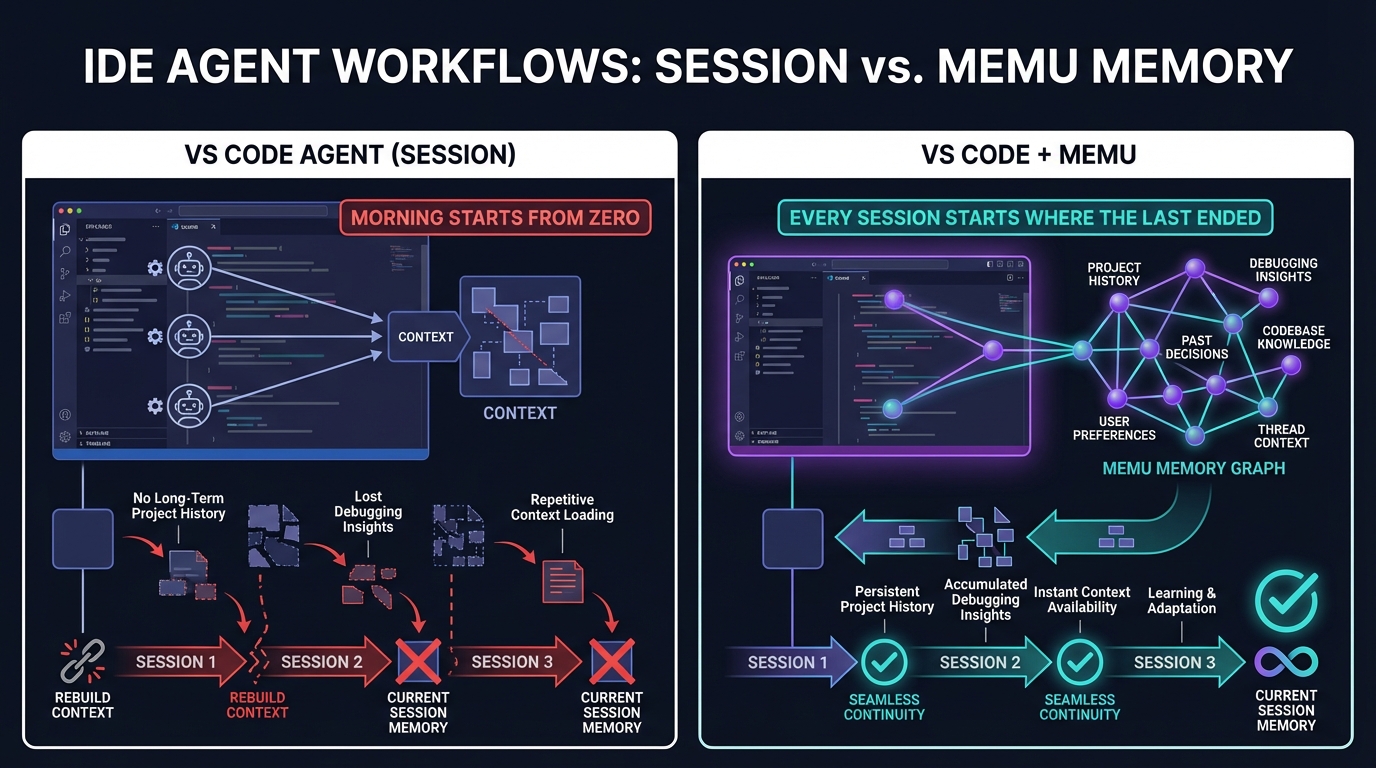
Session-scoped agents: Read codebase via indexing each session. Good for in-context tasks. But Monday morning starts exactly where Monday morning always starts — from raw code, not accumulated understanding.
MemU-backed IDE agents: Retrieve project memory at session start. Past debugging insights, architectural rationale, and team conventions are immediately available. Every session starts where the last one left off.
Empowering VS Code: Better Together
- Long-running tasks: VS Code manages the execution; MemU provides historical context about similar tasks and known failure patterns.
- Multi-provider agents: VS Code hosts Claude, Codex, and Copilot; MemU gives all three agents shared project memory so they don't duplicate work or conflict.
- Team development: When multiple developers use agent-mode on the same project, MemU ensures collective knowledge is shared, not siloed per developer.
Get Started with MemU
Add persistent memory to your VS Code agent workflow. The MemU Agentic Memory Framework works with any IDE and any AI provider. Visit memu.pro to explore the API, or check out the GitHub repository to start building agents that remember.
Tags: VS Code, agent mode, developer tools, IDE agents, MemU AI, persistent coding memory